Tuesday, 5 July 2011

Tracking Police Cars....

Morning everyone,

A short blog post about how my MSc research project is going. In one word? Stuttering. I've got some great data but I'm not quite sure what I'm doing with it or what my hypothesis is. Not great eh? I know...! My original plan was to consider how long police vehicles took to respond to 'Immediate' 999 calls, that is those that should be responded to within 12 minutes. However due to the way that the Police database works, this doesn't look like it will be possible. At least not in the way I wanted too. The problem is that their system does not record a vehicle as actively responding to a particular incident until it arrives at the scene...! Odd isn't it. I'd have thought as soon as the dispatcher told a car to answer an incident, that the car would be 'logged' as active on that incident. Because of this, I'm having to work backwards. That is, I take the time that the dispatcher records a car as being assigned to an incident, and then I find that car in the GPS log, and see where it is, and the journey it takes to the incident. This is producing some strange results, but also some good results. For example the below:

(Please note that this data is over 2 years old and that the incident location has been arbitrarily moved for the purpose of this blog post for confidentiality reasons)

Here it is possible to clearly see the vehicle leaving Holborn police station, and driving to the incident in the North of Camden. This journey actually takes the vehicle around 25 minutes, much longer than the Police target of 12 minutes. The reason is immediately obvious - the distance it has to cover. My next step will be to attempt to investigate whether there were any nearer cars at one of the other police stations who could have responded sooner than this vehicle - though again whether this will be possible due to the quality of the data I am unsure.

Friday, 17 June 2011

Success !! Eat my code PostgreSQL...

Quick little blog post to celebrate spending almost all of today working out how to keep a leading zero when you extract the DAY from a date field in PostgreSQL. You see normally you can do something like this...

SELECT EXTRACT(DAY FROM date) FROM yourtable

Which is fine. It will give you a value between 1 and 31. However I wanted the values below 10, to be returned as 01, 02, 03 etc. Alot of messing around has finally led to me finding the 'lpad' function. What that does is tell your query how many characters the result should be, and then pad it with whatever you want. So if I tell the query my result should be 10 characters long, with padding X, then when it grabs the value '1' it actually turns it into 'XXXXXXXXX1' (note the 9 X's). So using this, I told it that the result should be two characters long, and that it should pad with '0's. End result below.... awesome...especially pleased as I figured it out all by myself... haha.

UPDATE camdencrimes2
SET camdengps_link = (EXTRACT(YEAR FROM date_of_incident) || '' || EXTRACT(MONTH FROM date_of_incident) || '' || (SELECT lpad (cast((EXTRACT(DAY from date_of_incident)) as varchar), 2, '0')) || '' || incident_id);
SELECT DISTINCT(camdengps_link) FROM camdencrimes2

EDIT: Have since found out that there is a MUCH easier way to do this using the to_char function and defining the data output as 'DDMMYYYY'. I thought something like this would exist but couldn't find it until someone told me.

Monday, 6 June 2011

PostgreSQL thoughts...

PostgreSQL, and the spatial extension to it PostGIS, are open-source database alternatives to the like of Oracle and MySQL. And they're pretty good. I completed a module earlier this term ran by the great Dr Claire Ellul (though she was a bit tough on marking my assignment!) during which we were introduced to the basics of creating, updating and querying tables - and then linking the spatial aspects of those tables up to QGIS - which is another open-source software, this time as an alternative to the like of ArcGIS which is the mainstream GIS software. Here's a random map I made in QGIS having linked it up to a PostgreSQL database I made, to break up my waffle... ;-)

So anyway, having had a good mess around with PostgreSQL and it's interaction with QGIS, I decided to make use of it's power while completing my dissertation. You see I've got two datasets for my dissertation, the first is a set of GPS tracks with around 600,000 points, and the second a set of incident locations numbering around 4000 rows. In excel. So if I'm going to do anything serious with them, I'm going to need a way of playing around with the data, and give I don't have enough money for an Oracle license or similar PostgreSQL seemed the way to go. It's been pretty good, but there are some little tweaks, cheats and interesting behaviours I've noticed - some of which have caught me out and really slowed me down. These include...

  1. If you try to create a column of type 'Geometry' using right-click in the GUI, then it doesn't create it properly. You think it has. But it hasn't. You have to use the command 'CreateGeometryColumn' instead.
  2. If you install generic ODBC drivers into Windows, you can reverse engineer* database diagrams using Microsoft Visio. Really excellent. *As in make a diagram of your already existing database.
  3. When you use a command such as "SELECT table_name INTO TABLE new_table_name" to move data around, the new table that you've created inherits the columns and types of data from the old table, but not the contraints and primary keys etc that were in your previous table. This has been a real doozy. So instead I have now started making the new table first, using the INHERITS function, and then using the INSERT INTO funtion with the SELECT function to move the data over. EDIT: (I've now discovered this isn't quite true. Or rather it is.. but it links the two tables permanently. Which isn't what I was looking for. So I'm actually still at a loss).
  4. If in doubt, communicate with other people! I've joined the postgis-users@postgis.refractions.net mailing list, and have been helped with a few more complicated queries by other postgis users. I've also helped a few out myself which felt nice!
  5. That concatanating non-text fields in a query is odd. I've been getting by, but I don't fully understand it yet. For example the below queries... according to the documentation the second one should work... but it doesn't... however the first one does.
    update incidents
    set key='' || date_of_incident || '' || hour_of_incident
    But this doesn't....
    update incidents
    set key= date_of_incident || hour_of_incident
So anyway... that's my thoughts and moans etc on PostgreSQL at the moment. It's really good basically. But I do worry that Oracle is the mainstream and that the skills I'm acquiring in PostgreSQL, whilst useful and fairly transferable, would be better spent learning Oracle.

PS: I've typed this blog post while a query is running. Which has been running for about 15 minutes now. I really don't think it should take that long. I should perhaps stop it. But what if it's right and is just taking a long time? Grr.

Saturday, 12 March 2011

Godlike Powers....

A few weeks ago as part of our module 'Geomatics of the Coastal Zone', we were set an assignment to model the flooding of the village of Arundel. Slightly morbid... but also brilliant. I much prefer doing coursework with practical applications - 'real' stuff that you can imagine yourself needing to do in the future for a job or research project. To get us going we were given a 1 kilometre square set of Light Detection and Ranging (LiDAR) data - which essentially is a set of points with defined coordinates - which crucially include height data. Here's an example of LiDAR data when viewed in 3D - you can see how it creates a surface when colours are used to represent different heights:


So using this, we calculated the height of the river running through the middle of the village (with some difficulty as the LiDAR data we had didn't return any readings from the river, only bathymetric LiDAR does this), and then started to look at what would happen as the height of the river rose metre-on-metre.


The results when graphed looked like the below, which shows water height above the average river height, which was about 1 metre. The colours change from red to blue as the rivers flood defences break!


It's also possible to visualise the flooding using ArcGIS and data from the Ordnance Survey. The below images show the water 2 metres above the river height, and then 5 metres. Notice the flood defences on either side of the river in the first image - meaning that much of the water shown wouldn't actually have reached that area, but then with the 5 metres image it certainly would have done!

So anyway, that's what I've been doing for the last week or so... flooding Arundel. There are quite a few issues with the way that this has been done, such as the calculation of the river height, and the LiDAR data being quite old, but it gives a good demonstration of how LiDAR data can be used in ArcGIS to model different situations.

Friday, 25 February 2011

Starting to think about my dissertation.

Over the last few days I've had to start putting serious thought into my summer thesis. It's crazy how its come around so soon after the start of the course. Last September it was fine, you think "Ah, months away, something will come to me soon, I'll get passionate about an area and then follow that" .... then X'mas comes... and goes.... and you're bogged down in coursework... and then BAM. Although we're constantly told it's only a short project, and not to worry about it too much, we're also told to consider what skills we want to get out of it, and make sure that they're relevant for what we want to do afterwards. So as you can see it suddenly isn't just a short project anymore, it's the rest of our lives. Ha. Tad dramatic I know.

And that is where I've got to stop writing unfortunately...! Reason being I'm fortunate enough to have been given access to some data of a confidential nature. People within the Department will no doubt know what I'm talking about, but other than that it's hush-hush. Suffice to say I'll be doing some spatio-temporal analysis, mostly on the movement of cars around a London Borough, and that the results might be quite interesting. Spatio-temporal being, as I'm sure you've guessed, analysis of a spatial nature combined with temporal (time) nature. So maybe firstly looking at the movement pattern of the cars, seeing which streets are visited more maybe, and then looking at how this varies over hours/days/months etc.

As a random aside, this is a map that I created for some coursework a month or so ago that I thought was pretty cool. It's a representation of how air pollution may increase around the town of Lydd from the expansion of nearby London Ashford Airport. I produced it to note firstly how the consultants (employed by the airport!) had done a terrible job of modelling the increases, and secondly to show what the figures might actually be if they had done it properly (Hmm.. this is probably the same thing, right?):

Saturday, 19 February 2011

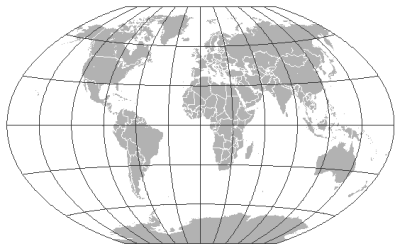
Map Projections

The Winkle triple world map projection, credit to ESRI
What's a map projection you ask? Well essentially it's the different ways in which we can decide to flatten the spherical earth to be a flat map, suitable for viewing on a piece of paper or on a computer screen. There are different projections available as you just can't flatten something that's spherical without 'breaking' it or warping it. Try it with an orange... carefully peel it so it stays in one segment.. now try and flatten it on the table without applying very much pressure. You can't do it. One bit of it always stick up doesn't it. Well that's essentially what map projections are about - as the way that we DO flatten the earth (or orange peel) means that we get distortion.

So anyway, here's an article about map projections from ESRI who know alot more about it than my trivial understanding! For those who don't know, ESRI are the people behind the GIS industry standard Arc software:

http://blogs.esri.com/Support/blogs/mappingcenter/archive/2011/02/17/an-alternative-to-web-mercator-winkle-triple.aspx

EDIT: Just coming back to this blog post, as the BBC have recently shown an excellent documentary about mapping which is very relevant! LINK

Thursday, 17 February 2011

Some good Geo-stuff.... and some bad Geo-stuff.

As always, Twitter is a constant source of excellent GIS and general Geo 'stuff'. The community is so active it's untrue. Sometimes it's rubbish however. Maps for the sake of it that don't really 'show' anything other than a nice picture. Or worse, maps that show pointless things badly. Maps for maps sake aren't really my bag.
That said, many great ideas and invention have come out of things that weren't originally meant, for example penicillin was discovered by Alexander Fleming after he left a dish of bacteria uncovered for a few days and returned to find the dish covered in bacteria apart from a small area where penicillin had been...! So, on that theme, here's something I think is rubbish but what do I know! That's right. It's some sort of weird map, that someone has turned into a face. Where is it a map of? Who knows. What's the purpose? Art I guess. Hey ho. So clearly this doesn't rock my boat. Which my two arty housemates will no doubt chide me for. I'm not against art at all, I like art, but this is just silly. Anyway, onto better things, if I do say so myself! It's a little map I've just put together for my Coastal Engineering assignment at Uni. It's pretty basic, and could do with some towns and features for the user to orientate themselves, perhaps a small extent window in the bottom right to show which area of Britain it's in, but I think it does a job - it's shows where the Sites of Special Scientific Interest are on the South Coast.